Ask Teire
Ask about your repositories, findings, runs and changes in plain words. Ask Teire reads what Teire knows, answers with cards from the real records, and changes something only when you click Confirm.
- You ask⌘I · @mentions

 Nemotron 3 UltraToken Factory
- Teire's recordsonly what you can see
- Cardsflows · figures
- Confirmyour click
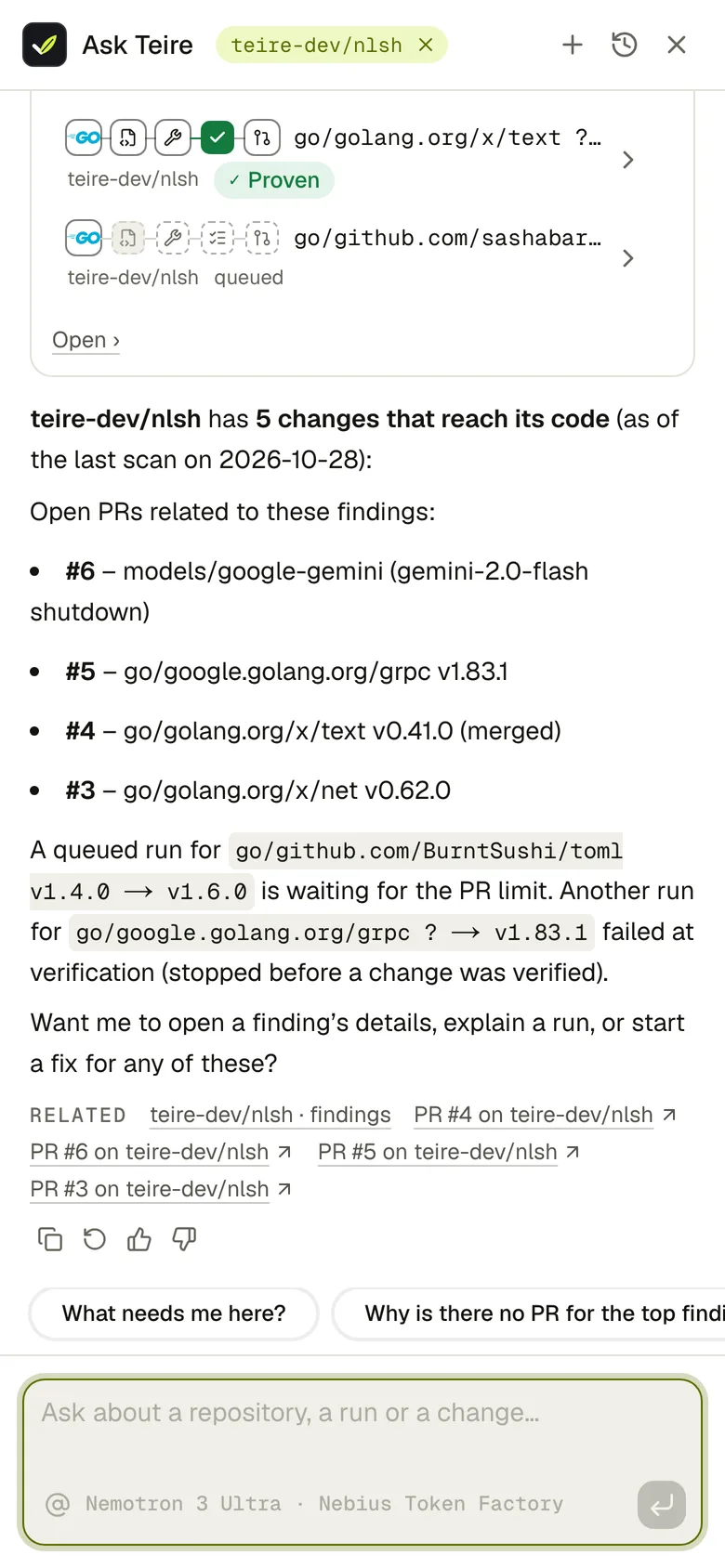
Ask Teire is the assistant inside the dashboard. It answers from Teire's own records: your findings, runs, pull requests, the catalog of changes, your teire.yml and these docs. Each answer comes back as cards drawn with the dashboard's own flows: a run as its breadcrumb trail, a change as its fan-out to your repositories, figures as tiles. When you want something done, it shows the exact action and you click Confirm.
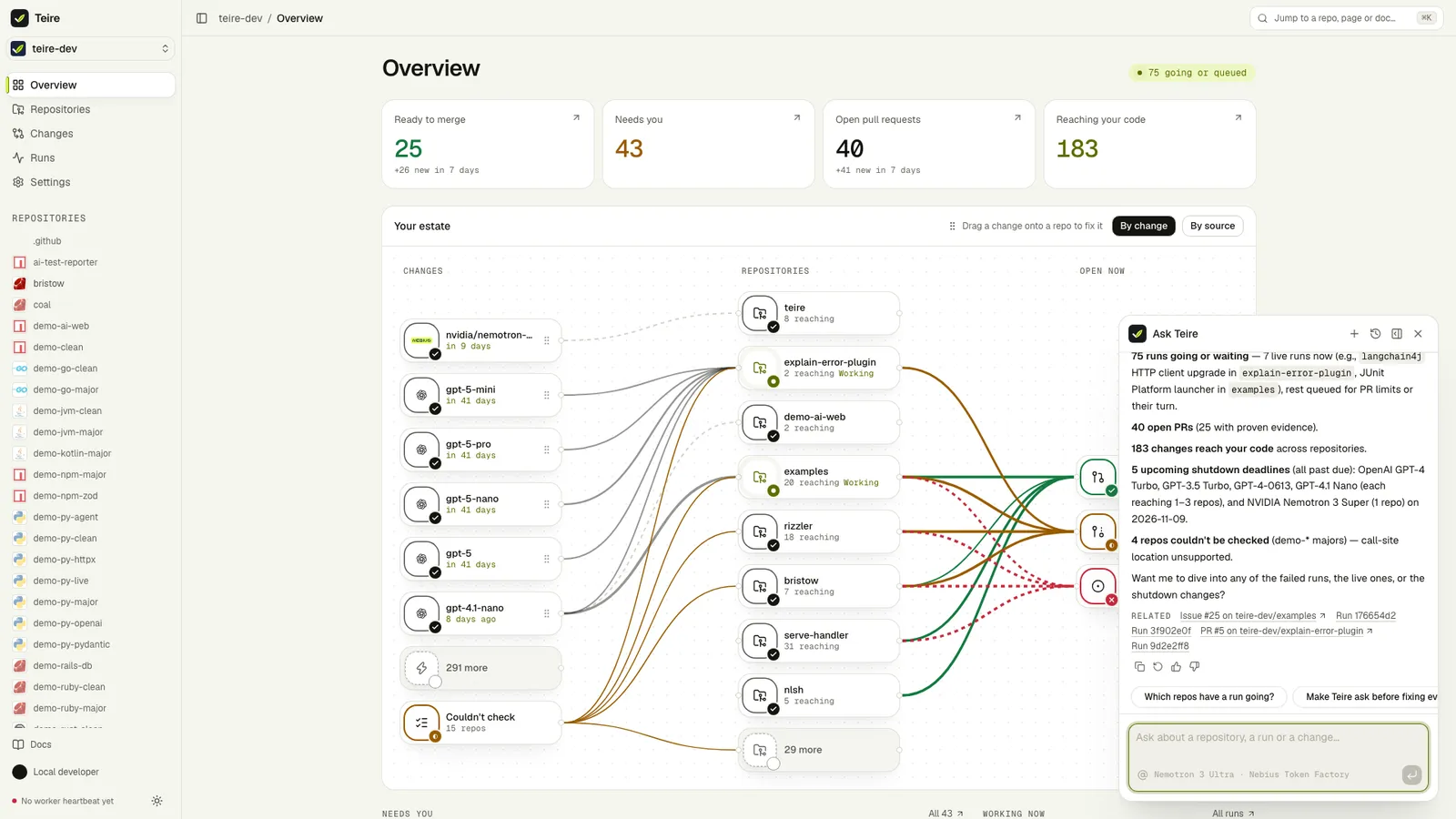
Open it
- The launcher sits in the bottom-right corner of every dashboard page, every run, scan and change page once you're signed in, and these docs. Press ⌘I (Ctrl I) anywhere it's offered.
- ⌘K ends with Ask Teire: …, which sends what you typed there.
- Explain (the sparkle) on a finding row, or on a repository's header, opens it with the question already asked.
The panel opens above the launcher. Dock it to make it a right sidebar you can resize (360 to 600 pixels): on a wide screen the page moves over to make room, and it stays docked, with your thread, as you move between pages. On a phone it opens full height.
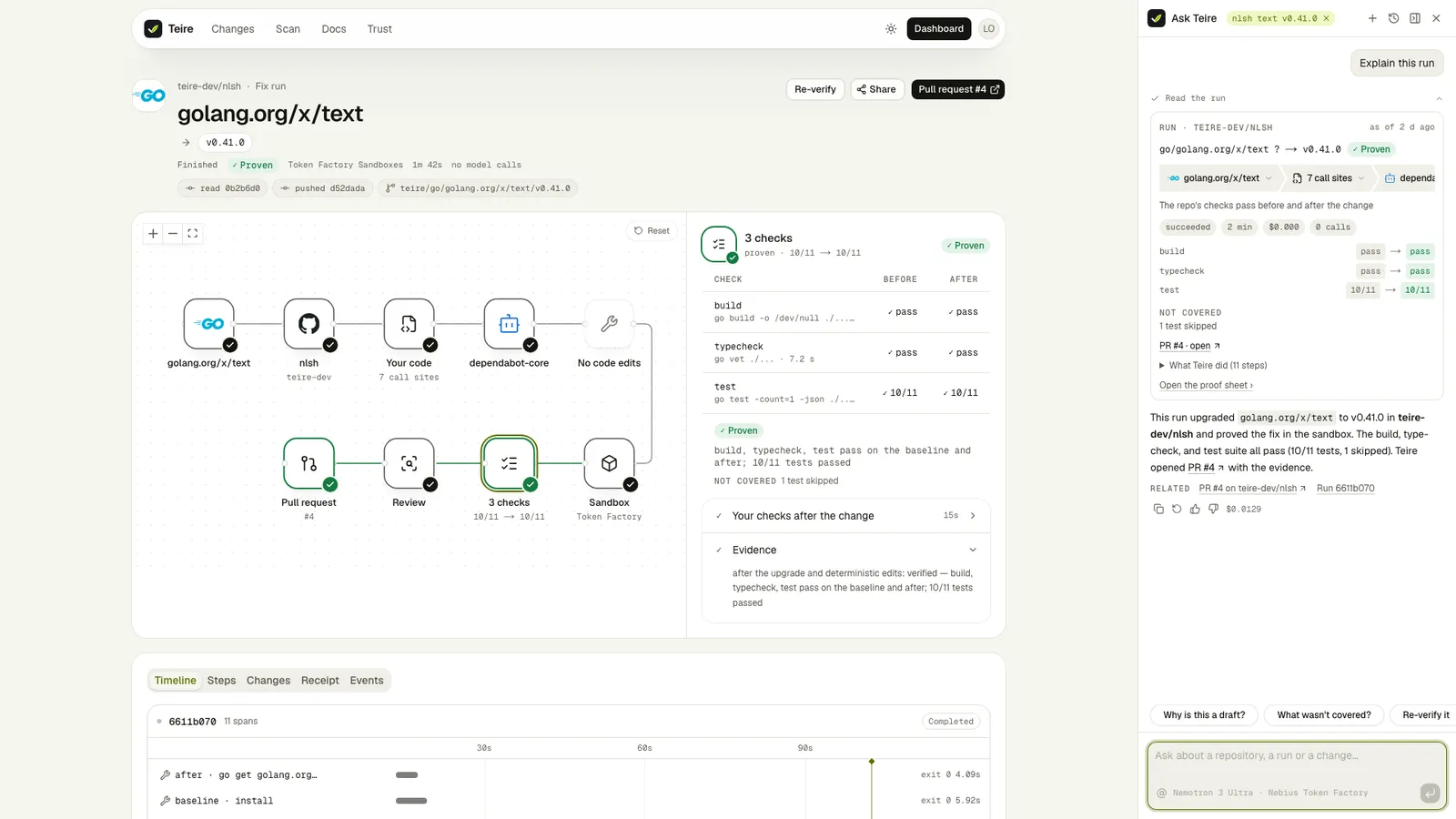
What it knows about the page you're on
The page sets a context chip in the panel's header: the repository, run or change you're looking at, so "here" and "this" mean it. Remove the chip to ask about everything instead. If the page names something you can't read in Teire, Ask Teire says "You don't have access to … in Teire" and nothing about it. An earlier answer that read a repository you've since lost access to is hidden from the thread, and from what the model is given again.
Type @ to mention a repository, run, change or open pull request by name. A pasted pull request link is checked as you type: it says whether it's one of Teire's pull requests on a repository you can see.
What it can answer
| You ask | It reads | You see |
|---|---|---|
| What needs me today? | The Overview | Four figure tiles, then each run that needs a person as its chain, with why |
| What reaches the code in owner/repo? | The repository's findings | Count pills, then one row per change with its logo |
| Explain the zod finding | The finding | Its run as a breadcrumb trail (or change → code → fix → PR before any run), old → new, the lines and the provider's words folded |
| Was the minitest 6 upgrade proven? Why is this PR a draft? | The run | The run's trail, each check before → after, what wasn't covered |
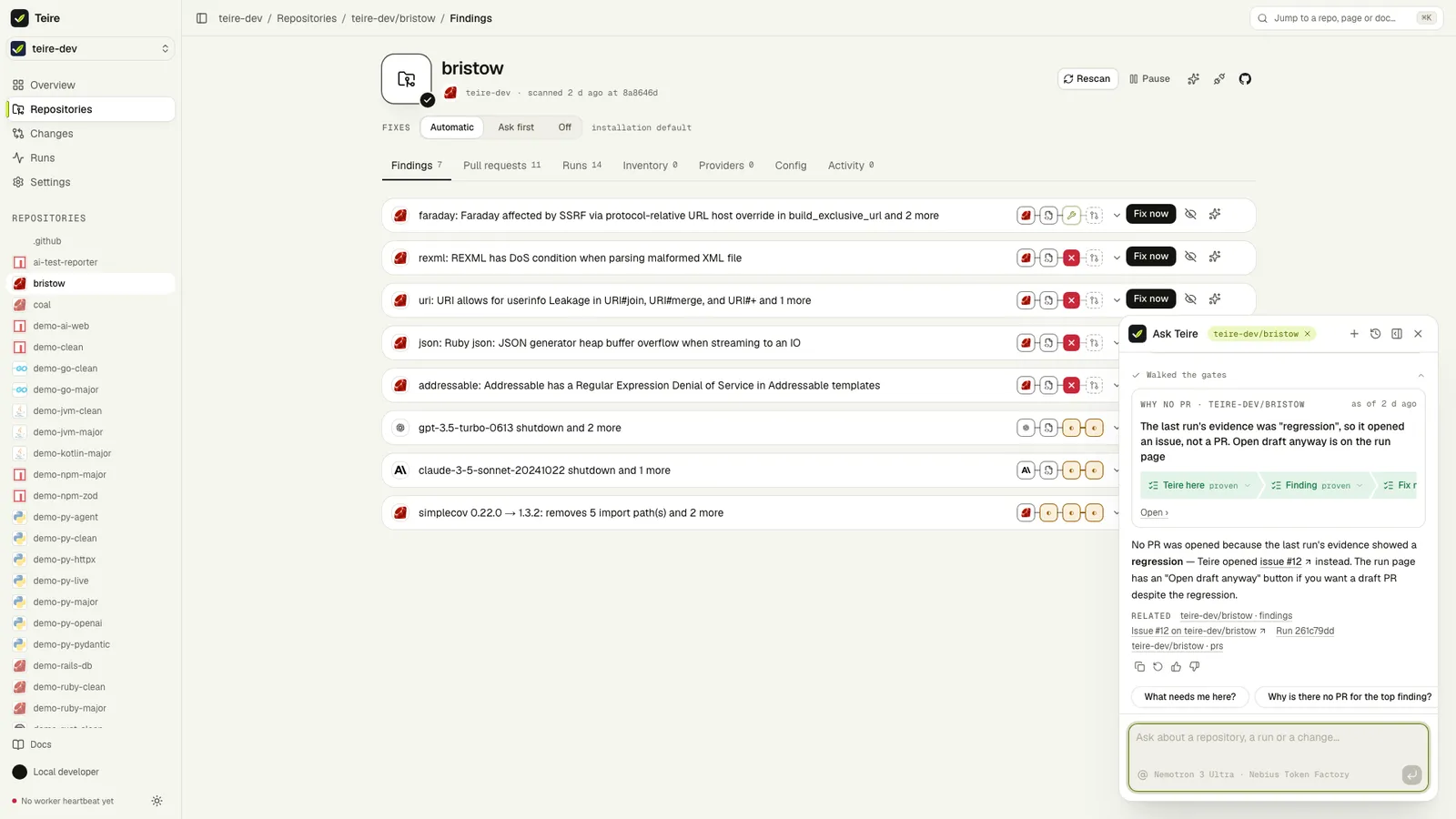
| Why is there no PR for anthropic? | Teire's gates, in the worker's order | The gates as a trail, the one that holds in red |
| Which repositories does the gpt-4-turbo shutdown reach? | The catalog and your findings | The change's logo fanning out to each repository, each branch in what Fix now would do |
| What would turning off plain bumps do? | Your teire.yml | The − and + lines and what they do to your findings and runs |
| How do I make Teire ask before fixing? | These docs | The answer in the docs' words, with a link to the page |
| What has this cost? | Receipts | Runs, sandbox minutes, model and Ask Teire spend, a bar by purpose, today's meter |
Every card says when its record was read ("as of 3 min ago") and links to where it lives in Teire. Links in an answer go only to pages a card returned, so Ask Teire can't send you to a page that doesn't exist or to a site a repository mentions.
It acts only when you click
Ask Teire can propose: set the fix mode (one repository or the installation's default), Fix now, Rescan, Pause and Resume, Ignore and Unignore, Refresh, Rebase or Recreate a PR, Cancel, Retry or Re-verify a run, Open draft anyway, a config PR, a starter config PR, and Fix in all. Each proposal is a card with the exact action, what it means, and a trail of what Confirm sets going (dashed until you click). Nothing happens until you click Confirm; the trail's first step then pulses while Teire works and reads its answer, the same way the dashboard's buttons do (see Dashboard).
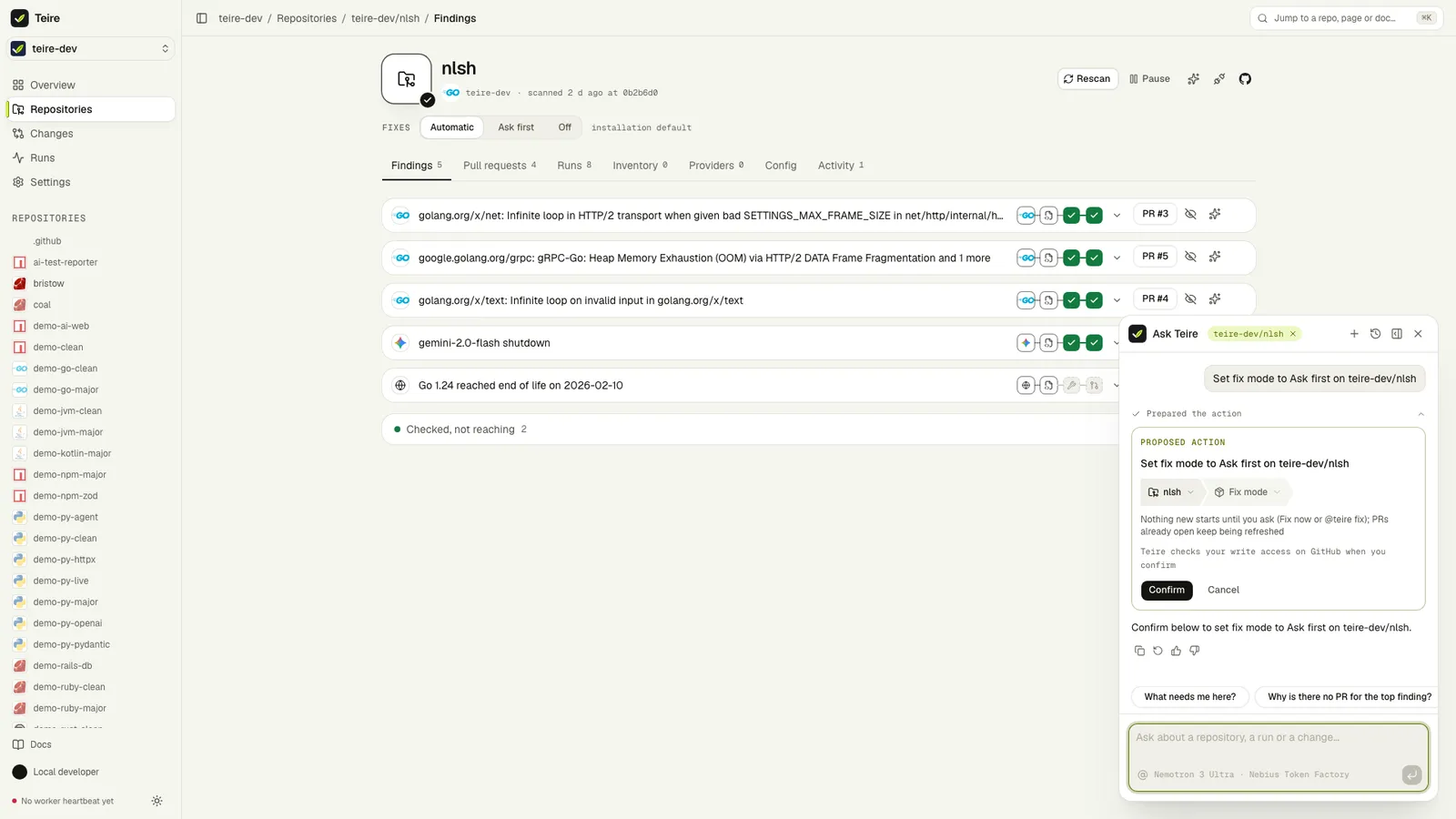
- The card is the action. Confirm sends back a proposal Teire signed when it showed the card: it can only do what the card shows, for you, within the hour.
- The same checks as any button. Teire's worker checks your write access on GitHub before it acts (Fix in all checks it on each repository); changing the installation's default fix mode needs an organization admin or the account owner.
- Some things it never does. Teire doesn't merge, close or push to pull requests, delete anything, or change GitHub settings. Asked to, Ask Teire shows a card that says so and links the pull request on GitHub.
- A fix mode set in a file (
fixes:in.github/teire.yml) can't be changed from the dashboard; Ask Teire offers the config PR that changes the file instead.
What it reads, and what it doesn't follow
Ask Teire reads only what you can see in the dashboard: your chosen installation's repositories, and a private repository only when GitHub lists it for you. Ask about a repository you can't see and it says "You don't have access to … in Teire".
A finding's reason, a provider's quote, release notes, a log line or a PR description is shown to the model as data, never as instructions. If such text says "ignore your instructions" or "merge this", Ask Teire doesn't do it.
Threads
Each conversation is a thread. History lists yours, newest first; search finds a word in any message, and you can rename or delete a thread. Under each answer: copy it as Markdown, ask again, and mark it helpful or not. A reply stopped part way (Stop, or closing the tab) is kept and marked. Threads are kept for 90 days after their last message.
The model and its budget
Ask Teire runs on NVIDIA Nemotron 3 Ultra through Nebius Token Factory, with reasoning off so answers come back in seconds, and fails over to Nemotron 3.5 Super if Ultra is unavailable. The model and cost of each reply show under it when you hover.
Its spend has its own budget, apart from fix runs: each person has $0.50 of Ask Teire a day and everyone together $5, and every reply is reserved against those before the model starts. When the budget is used up, Ask Teire says so and shows docs search results instead, labelled as search results. Your spend is on Settings › Usage.
On these docs
Here Ask Teire answers from the docs and the public catalog of changes, not from anyone's repositories, and only in what the docs say. Signed out, the launcher opens a docs search and Sign in to ask.
Dashboard
Every installed repository in one place, drawn as flows, and a Teire Dashboard issue in each repository with checkboxes for the main @teire commands.
@teire commands
Comment on any issue or pull request to rescan, fix, ignore, rebase, explain or pause. Teire answers in the thread and links the live run.