Dashboard
Every installed repository in one place, drawn as flows, and a Teire Dashboard issue in each repository with checkboxes for the main @teire commands.
 Overviewwhat needs you
- Your estatedrag a change
- A repositoryits findings
- Fix nowone click
- The runbefore → after
- Pull requestyou merge it
There are two dashboards. The web one at /app covers every repository you can see. The Teire Dashboard issue lives inside each repository on GitHub. Both show the same findings and can start most actions.
The web dashboard
Sign in with GitHub. Teire asks GitHub which installations you can see and shows only those repositories. Installed somewhere new? Choose Refresh from GitHub in the switcher or in Settings.
The sidebar holds the installation switcher, the five pages and the installation's repositories, each with its main language's logo. An olive dot (lime in dark mode) marks a repository Teire is working on now. ⌘K (Ctrl K) jumps to a page, a repository, a change or a run, acts on the repository you're on, or searches these docs. ⌘I opens Ask Teire. Every list, tab and filter has its own address.
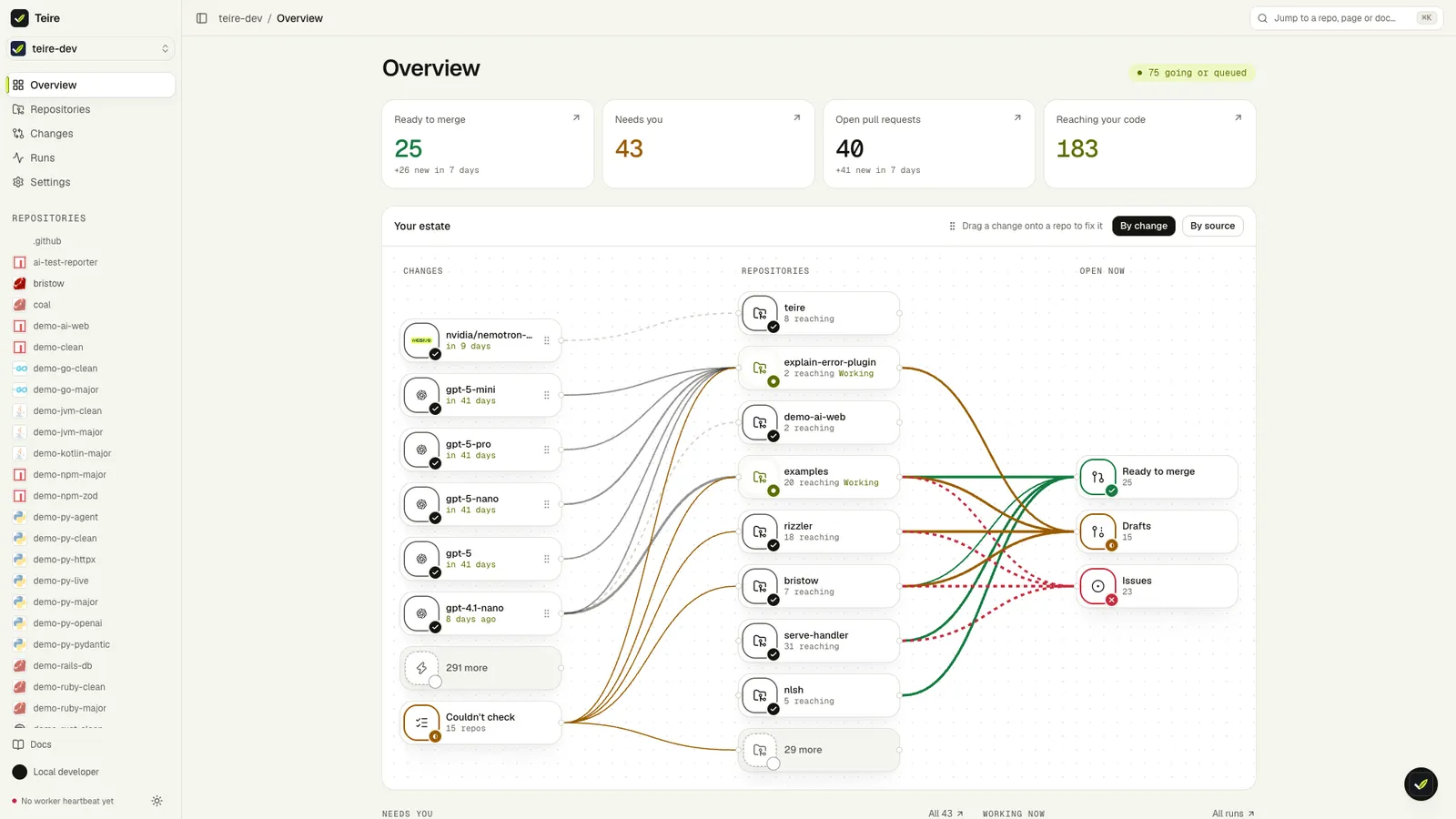
Overview. Four figures: ready to merge, needs you, open pull requests, reaching your code, each with what is new this week. Below them, Your estate draws three columns. The changes reaching your code (or, with By source, the providers and ecosystems they come from) sit on the left. Your repositories are in the middle and what is open now (ready, drafts, issues) on the right, joined by lines weighted by call sites. Drag a change onto a repository, or select it and press Enter, to see what Fix now would do there and start it. On a phone the estate is a list. Needs you and Working now follow, each run as its chain.
Repositories filters by state, fix mode, outcome and language, and switches between Table and Map. Each row's fix mode changes in place (Auto · Ask · Off, with a reset to the installation's default). Set fix mode… applies one mode to every repository shown, each with its own result.
Changes for you lists each catalog change that reaches your code, filtered by source and kind. Each change fans out to the repositories it reaches. A solid branch is an open PR, a pulsing one a run in progress, a dashed one a run Fix now would start, a grey one fixes off. Fix in all shows that plan per repository first, then starts one Fix now for each repository that would run. Each needs your write access there and gets its own result.
Runs lists every run as its trail, newest first, with the same filters the Overview links to.
Settings has five sections. Organization holds the installation's default fix mode and whether security fixes start on their own; only an organisation admin or the account's owner can change these. Repositories holds each repository's fix mode, Installations is where Teire is installed (with Refresh from GitHub), Usage is above, and Account is who you're signed in as.
Taking Teire's access away
Each of these is in Teire itself, and each that can't be undone asks you to type the name first:
| To | Where | What happens |
|---|---|---|
| Stop Teire on one repository | The unplug button on the repository's page | Teire is removed from it on GitHub with your own access (you must administer the repository, and the installation must cover selected repositories, not all) |
| Stop Teire on a whole account | Settings › Installations › Uninstall | Teire uninstalls itself as the app, after checking you own the account or administer the organisation; its runs stop and its data is removed |
| End Teire's access to your GitHub account | Settings › Account › Revoke Teire's GitHub access | Teire's authorization on GitHub ends and you're signed out everywhere; signing in asks GitHub again |
| Leave Teire | Settings › Account › Delete my Teire account | Your sign-in, Teire's GitHub access, your Ask Teire threads and what Teire knew you could see are deleted. Installations keep running until you uninstall them |
Sign out everywhere (Settings › Account) ends every session you have, on every device.
A repository page has seven tabs, each with its own address (/app/repos/<owner>/<name>/<tab>):
| Tab | What it draws |
|---|---|
| Findings | One row per change: its logo, its title and a change → code → fix → PR strip, with Fix now (or the open PR), Ignore and Explain. A row opens to the full flow and the lines it reaches. Also: what the sandbox decides (Upgrade and check), what couldn't be checked, what was ruled out, and what you ignored (Unignore) |
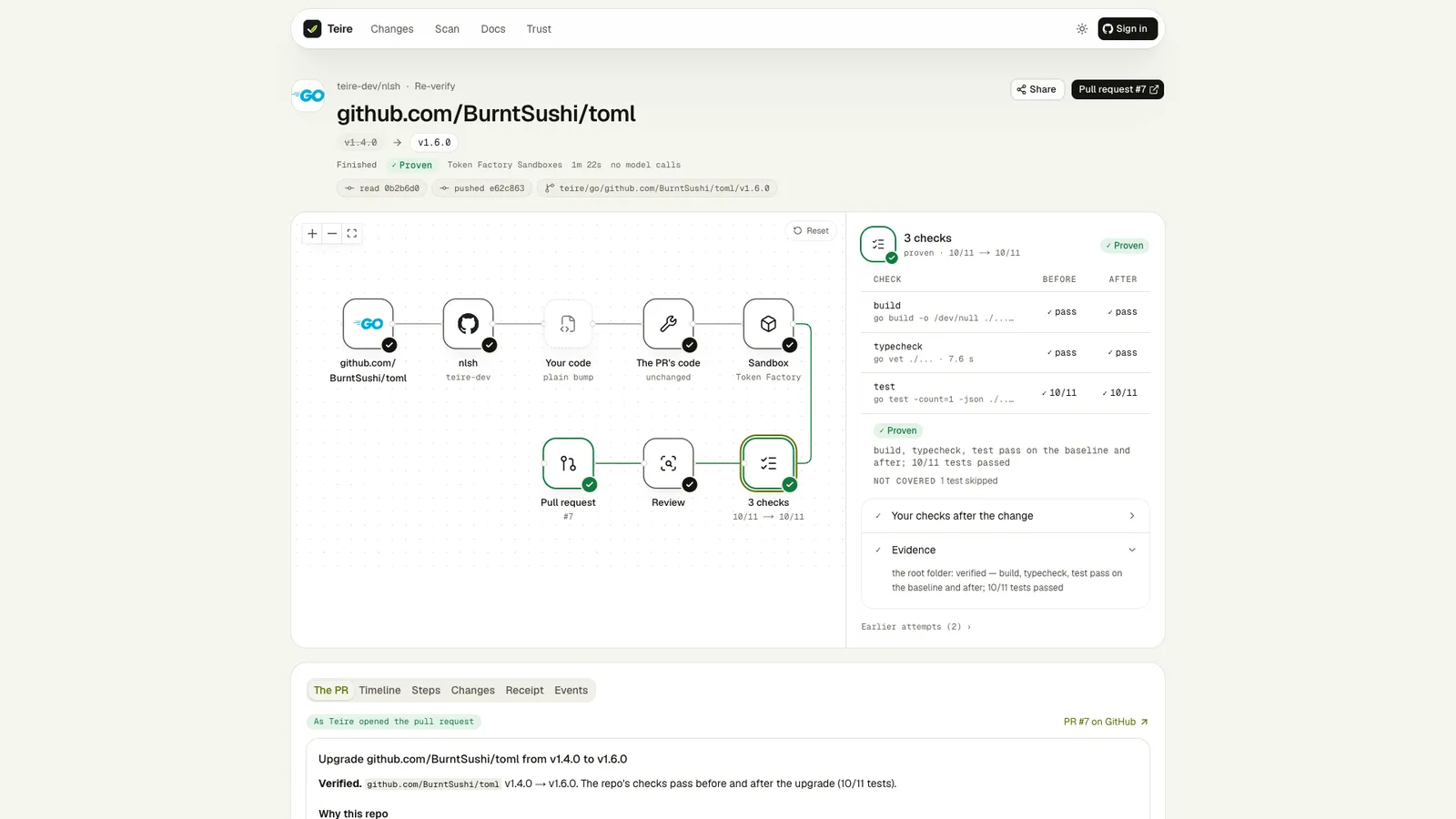
| Pull requests | Each PR and issue as a breadcrumb trail; a step opens its evidence. An open PR has Re-verify and Refresh, a closed one Recreate |
| Runs | The latest runs as trails |
| Inventory | Every dependency the last scan read, filtered by ecosystem logo and name |
| Providers | The APIs and model providers the code calls, each ringed by what reaches the code |
| Config | Every teire.yml key as a cell, with where it came from (the file, the organisation, the default); pick one, see before → after, confirm, and Teire opens the config PR. Open starter config PR when the file is missing or has problems |
| Activity | Every action on the repository (from this page, a comment or the Dashboard issue): who, where, and the result when it failed |
Above the tabs, Fixes sets the repository's fix mode: Automatic, Ask first or Off (see fix-mode). It always shows the mode in force and where it was set. It is locked when fixes: in .github/teire.yml sets it. Under Ask first and Off, Findings lists Upgrades available: what Automatic would have started.
Buttons
Rescan, Pause, Resume, Fix now, Ignore, Unignore and the fix mode work like their @teire commands. A message in the corner follows each one to what happened ("Rescan finished: 3 changes reach your code", "Refused: you need write access", or the run it started), with Undo where it can be undone. Teire checks with GitHub, when it acts, that you have write access. Ignore also closes that change's open PR.
A run page has Cancel while the run works: within seconds the model calls and the updater stop, its sandboxes close, and nothing is published after it. A failed or cancelled run has Retry.
A run whose PR is open has Re-verify: both sides run again on what the PR would merge, with its code unchanged. The after side is GitHub's test merge of the PR into the base branch as it is now; the baseline is that base. The result lands on the PR only if it still has the same head and base: a new Teire check run, a comment, and the draft state and evidence label set to what the checks now show. Re-verify runs under every fix mode, since it changes no code.
A run that ended in a "needs a human" issue has Open draft anyway: Teire opens its best diff as a draft PR titled Unconfirmed, with the evidence that stopped it, for you to finish by hand. Share copies the run's link and says who can open it.
The Teire Dashboard issue
Once a repository is active, Teire keeps one issue named Teire Dashboard up to date, after every scan, every PR or issue it opens or updates, every ticked box and every state-changing command.
| Section | Content | Tick the box to |
|---|---|---|
| Header | The last scan's commit and time, paused or not, the fix mode and where it was set | Rescan now |
| Upcoming deadlines | Each dated change, with its PR or verdict | |
| Affected | Each change with no PR yet: title, sites, priority | Fix now |
| Decided in the sandbox | Upgrades the code alone doesn't settle | Upgrade and check |
| Upgrades available | Under Ask first and Off: what Automatic would have started | Upgrade (Ask first) |
| Open PRs | Each Teire PR | Rebase |
| Needs a human | Links to Teire's issues | |
| Not affected, Not applicable | Collapsed, with the reason for each | |
| Ignored | What you ignored | Unignore |
| Inventory | Dependencies per ecosystem | |
| Config problems | Keys that fell back to their defaults, and why | |
| Commands | The @teire command list |
Ticking a box runs the action if you have write access; Teire clears the ticks and comments @you: … with what started. Set dashboardIssue: false in teire.yml to close the issue.
Public scan and dry run
See what would break in any public repository without installing anything, then watch Teire fix one change in the sandbox, without opening a pull request.
Ask Teire
Ask about your repositories, findings, runs and changes in plain words. Ask Teire reads what Teire knows, answers with cards from the real records, and changes something only when you click Confirm.